How to Book a Hotel with Rove Miles
Last updated April 13, 2026
Redeeming Rove Miles for hotel stays is simple and flexible. Follow the steps below to search, apply your miles, and confirm your reservation with confidence.
Step 1: Search for Hotels
- Visit rove.com/explore/hotels.
- Enter your destination, check-in and check-out dates, and number of guests.
- Browse available properties and compare rates, amenities, and room types to find the best fit.
Step 2: Apply Your Rove Miles
To redeem Rove Miles for your stay, you’ll want to select the miles option on the right-hand side:
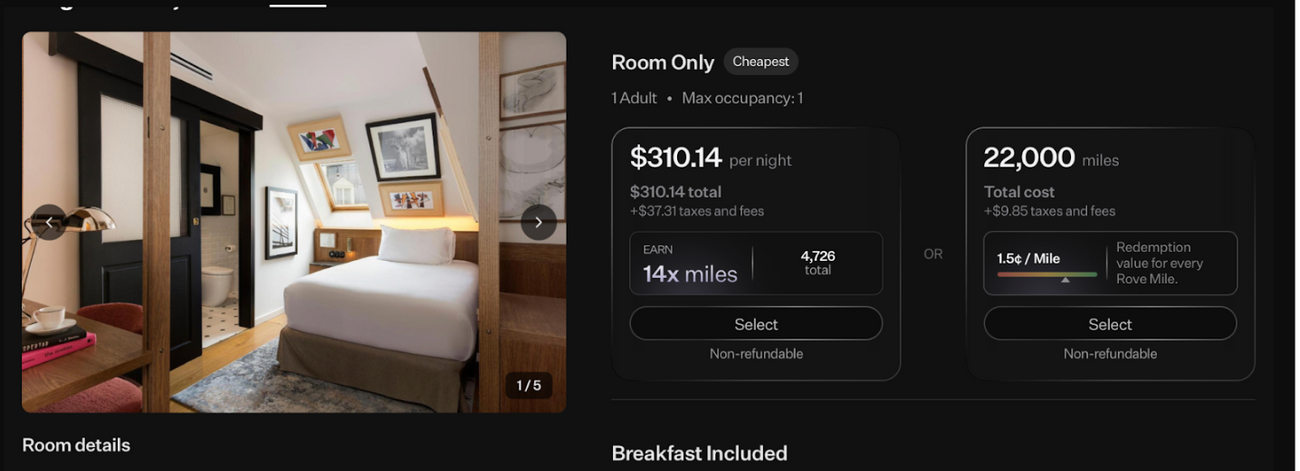
Availability varies by hotel partner, property, and room type.
Step 3: Confirm Your Booking
- Review all guest and room details before finalizing.
- Complete payment using your miles.
- After checkout, you’ll receive:
- Your Rove booking confirmation Your reservation stored in the “My Trips” section of your account
Step 4: Understanding Hotel Confirmations
There are two ways to book a hotel with Rove. Preferred Rove Rates are booked through Rove and will not qualify for hotel points or elite night credits.
Loyalty Eligible bookings are charged by the hotel itself, which means you’ll be able to view your bookings in your hotel chain’s app. You must make sure that you’re entering your hotel loyalty number at checkout in order for this to apply.
To request your hotel confirmation code, email support@rove.com with your Rove booking reference.
Pro Tips
- Always review your cancellation policy before finalizing; some rates are nonrefundable.
- Rove Miles used for hotel bookings typically post back to your account after checkout if canceled within the allowed window.
- Booking early may help you secure better rates and room availability.