How to Book a Flight Using Your Miles
Last updated July 2, 2026
Ready to book your next trip using Rove Miles? Here’s a clear, step-by-step guide to walk you through the entire process.
How to Book a Flight On Rove With Your Miles
Step 1: Search for Flights
- Visit https://www.rove.com/explore to start searching.
- Enter your departure city, destination, travel dates, and number of passengers.
- Toggle the search function to Miles instead of Cash.
- Browse through the available flight options until you find the itinerary that fits your plans.
There are two different ways you can redeem your Rove Miles for flights. The first is to complete a Direct Booking. In this case, you’ll be booking your flight directly through Rove. This has the advantage of being considered a cash fare by the airline so will earn you rewards.
You can also choose to transfer your Rove Miles to a partner for a booking. You’ll see these appear in flight search results as Transfer Bookings.
Step 2: Redeem Your Rove Miles
On the flight results page you’ll see all the available options, including Direct and Transfer Bookings. Once you’ve found your flight, you’ll simply need to redeem your miles.
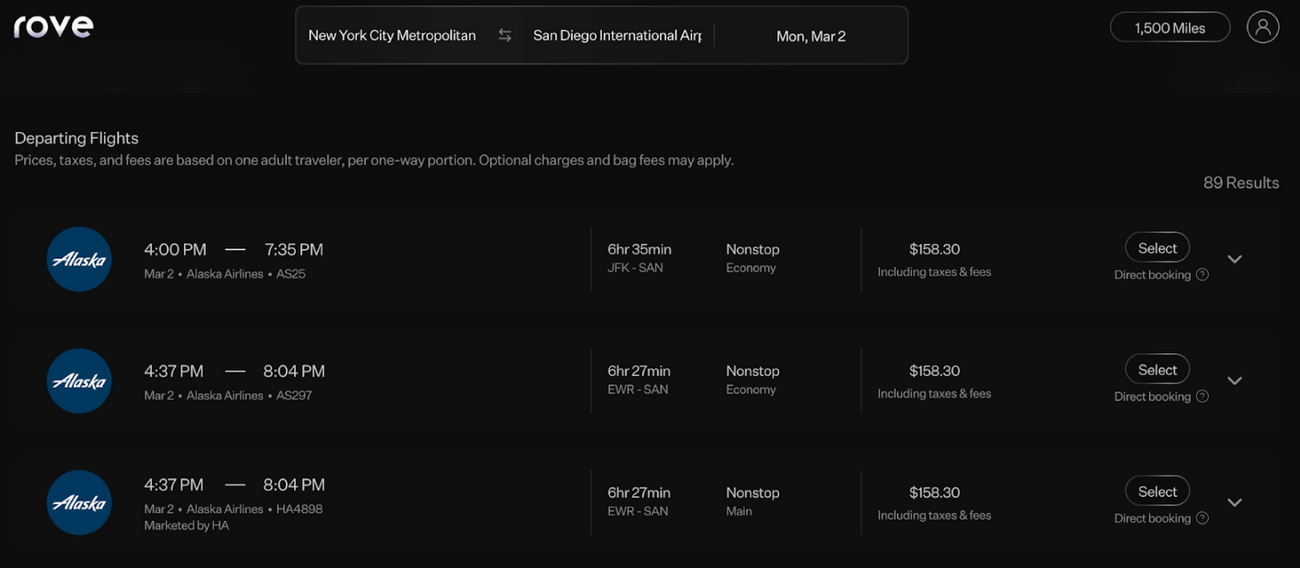
Rove currently supports:
- Paying fully with Rove Miles
- Miles + Cash
- Transfer bookings
Step 3: Complete Your Booking
- Review and confirm traveler information.
- Complete payment securely using your Rove Miles (and a credit card, if partial payment is enabled).
- After booking, you’ll receive:
- Your Rove booking confirmation Your airline confirmation code (PNR)
Step 4: Add to Your Airline Loyalty Program
If you want to earn miles directly with the airline, simply:
- Log into the airline’s website or app.
- Add your booking using your airline confirmation number (PNR).
- Enter your frequent-flyer number so the airline can credit eligible miles after you travel.
How to Transfer Rove Miles to Partners for Flights
Rove supports transfers to:
- Aeromexico Rewards
- ALL Accor Loyalty Programme
- Air Canada Aeroplan
- Air France-KLM Flying Blue
- Air India Maharaja Club
- Cathay
- Etihad Guest
- Finnair Plus
- Frontier Miles
- Hainan Airlines Fortune Wings Club
- Japan Airlines Mileage Bank
- Miles & More
- SAS EuroBonus
- Qatar Airways Privilege Club
- Thai Airways Royal Orchid Plus
- Turkish Airlines Miles&Smiles
- Vietnam Airlines Lotusmiles
- Virgin Atlantic Flying Club
- Virgin Red
With these partners, you can effectively access flight awards on all three major global airline alliances—Star Alliance, Oneworld, and SkyTeam—plus a robust hotel network via ALL Accor (). ALL's loyalty program provides better rates on top hotels brands around the world, including Raffles, The Savoy, Banyan Tree, The Plaza, Fairmont hotels, and more.
How to Transfer Your Rove Miles
1. Navigate to “Transfer Miles”
On the Rove website or app, look for the “Transfer Miles” page under the profile icon.
2. Select Your Preferred Partner
From the list of partners, choose where you want to send your Rove Miles (e.g., Flying Blue, Qatar, Accor, etc.).
3. Enter the Number of Miles
Decide how many of your Rove Miles you want to move. Each partner may have different transfer minimums or increments.
4. Confirm & Complete Transfer
Follow the on-screen instructions to confirm the transfer. Transfers can be instant or take a short processing time, depending on the partner.
5. Redeem on the Partner’s Site
Once your loyalty account reflects the newly transferred points or miles, redeem them for flights, hotels, or other travel rewards directly through that program.